Startup Feature

    • About

  • Top Free Tools Every New Business Needs

    What tools do I need to start a business? This article outlines some quick, easy, and free tools to help you start your business. Rather than being overwhelmed by the options out there, use these simple tools and get focused on the one thing that matters, actually starting the business!

    These beginner level tools are perfect for you to get started. They are easy to set up, easy to navigate and learn, and you can quickly build what you need to get back to focus on the main business.

    Productivity and project management tools.

    If you Google ‘productivity and project management tools for startups,’ you’ll see a myriad of different productivity and project management tools like Trello and Asana. ‘Use this app to save 1.5 hours a day’, or ‘use this tool to hack your productivity’, they say.

    That is all great for later down the line, but if you’re just starting your business. I would recommend the simple, free route.
    These would be Google Sheets and Google Docs. Sign up for a google account right away, and you will immediately have access to these tools. You literally can get them set up in under 5 minutes.

    Google sheets can be an excellent project and productivity tracker. You can build a simple spreadsheet, or download a template off of google to perfectly manage a multi-faceted project. But at this stage, you likely just need something simple, and Google Docs / Goole Sheets can just do that.

    My first meeting agendas for my business were all in Google Sheets, and they still are today! My first project lists were in Google Docs, and again, I still use that tool today to easily track many different projects.

    The next free tools for productivity and project management are Google Calendar and a handy notepad (that should always live on your desk). With a little creativity and proper planning, these 2 tools can help you manage all of your daily productivity and tasks.

    How do I use Google Calendar and Sheets?

    Whenever I think of a new task or part of the project, I immediate Google Calendar. Right then and there. I don’t need to think about it until later when it is time to make the work happen. I know I have it down, whether on my laptop or phone, and I will get back to it. With juggling everything you need to start a small business, the last thing I need is to be constantly forgetting tasks. Even waiting 2 minutes might mean I forget that task until it is too late!
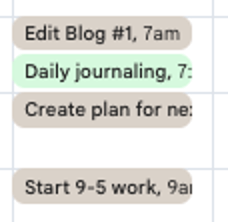
    In this sample, I have a few tasks that I wrote down the day before, so I know I can get up, tackle them, and move on!

    Each week, I organize all of the tasks on my google calendar for the upcoming week. That helps me identify how much time the task will take and what I need to do each day of the week. I can break down every day into discrete 15-30 minute tasks, or even block off longer if I need to (even though I am not so productive past about 45 minutes of continuous work). The calendar screenshot above shows that. Small, discrete tasks keep my days productive.  

    Specifically I add each item to the calendar and the default color of grey (which I changed to be the default) and then when I completed the item I manually change the item to a dark green. That gives the satisfaction of completing the task and also lets me know I don’t need to look at those items again.
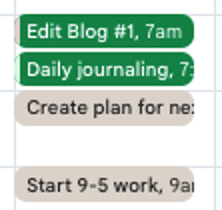
    You can get fancy with it like I did above by having some blocks be different colors – e.g. the light green is for ‘personal’ tasks not related to work or business. But that can come later.

    With this strategy, you will also a permanently referenceable file in my Google Calendar of all the tasks that I’ve completed. You can keep track of every business project and task, and personally, I love the look of the dark green showing that I’ve had a productive day. That inspires me to have a productive next day, and the next day, and I can look back upon a successful week.

    To supplement this calendar, I also have my handy notepad that lives at my desk. It does not move, ever!

    The items I jot down here are smaller or personal items, like taking out the trash, or doing laundry. I physically remove that item from my mind and onto the paper. I will get back to it later! Work and business live on the google calendar.

    Financial Management Tools

    Start with Google Sheets. There are many, many, tools out there. But if you are just starting, Google Sheets is the simplest, best way to do it.

    Take a look at this sheet for example. Want to manage a budget? Forecast revenue?

    Start by making a tab for the specific year. You can make each column a month, and each row a different type of expense.

     When you’re just starting out you shouldn’t have too many different categories of expenses so this should be sufficient to start your business. Again, the focus is on starting and not overwhelming yourself with all the tools you might need.

    Marketing and Design Tools

    The greatest tools to start marketing your business are on Canva and Google sheets. I like the free version of Canva because it offers an immense amount of customization and tools that you could use to design a quick logo or marketing materials. They even have a new AI feature that allows users to plug in a request for AI which will generate the image for you!

    If you’re overwhelmed by the need for “marketing” this may be an area where you focus some of your budget. If you’re spending too much time on a logo or colors, and that isn’t your expertise, maybe you should look to friends, or have someone help make a quick logo for you (Fiverr or Upwork provide good, inexpensive options).

    You can also head to Coolors.co for a quick color palette generator.

    This initial marketing can be an extreme distraction if you focus too much time on it unnecessarily. Again the logo and colors can be changed in the future and these free tools give you a great enough start!

    Communication and Collaboration

    Gmail and the free version of zoom should provide you all you need to start the business. Ideally you shouldn’t have to pay for any communication or collaboration tools at this point as the Google suite provides live working documents that you can work on with teammates.

    Canva also provides A-Team version if you would like to update or upgrade in order to collaborate in live time with teammates.

    What tools should you look into next? 5. Analytics and Data Tracking Tools

    What tools are next?  Now that you have the basic tools you need to actually get the business off the ground, you can focus on your business itself. Spend some time on that. Use these tools for a week and get your business launched. Next you can focus on analytics, data tracking, and integrating more complex tools as your business grows!

    This article provides a brief overview of the simple, easy, and free tools to help you start your business.
    November 30, 2024
    business productivity tools, essential free tools for startups, free business software, free business tools, free online tools for entrepreneurs, free tools for entrepreneurs, free tools for small business growth, must-have tools for new businesses, new business essentials, small business tools 2024, Start a business, startup resources, startup tech tools, startup toolkit, tools for small businesses, tools for startups

  • Break It Down: Start Your Business Today with Simple Steps

    We’ve all been there. And in fact, I might be there right now. You have that entrepreneurial mindset, you truly believe that you could start a business, and you may even have built out your ideas and plans to launch… but something lingers. Something prevents you from starting, for days, months, and even years. That roadblock you are facing may be fear.

    I thought about starting this blog for many months now, but I couldn’t get myself to do it. There was always something that came up. My regular “9-to-5” job, an event with friends, something to plan, a lazy morning. Each of these items would be a small way to push off starting my business. But why, really, wasn’t I starting. Was it fear?

    I’ve started several businesses before. Some have succeeded, while others have failed. But I still run into one of the biggest problems that many aspiring entrepreneurs face. Fear.

    How do you push past that point? How do you take those first steps to starting your business to pursue your desires and dreams, and get your business out into the world?

    Break It Down.

    I am diving in right now. Taking the first steps. And I want to encourage you to do the same!

    This blog will help provide some action items to help overcome fear. It is time to officially begin. No more putting it off.

    I believe the strongest approach to tackle the start is to break it down. Break down that start into small, actionable steps. Cross them off the list one-by-one. Rather than feeling a monumental sense of “how can I ever do this,” methodically tackle your mini-tasks. And before you know it, you will have officially launched!

    What does “Breaking it Down” actually look like?

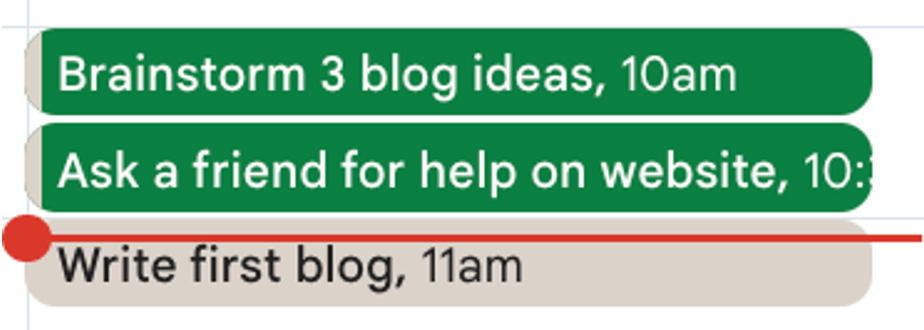
    How did I get started with this business? It is November, and I should have launched this in March. But I didn’t. So this week, I wrote down a small list on my google calendar of all of the different steps necessary to start this.

    • Come up with the first three blog topics.
    • Ask a friend for help with basic website design.
    • Start drafting blog number one
    • Set time for blog number two.
    • Set time to edit blog number one.

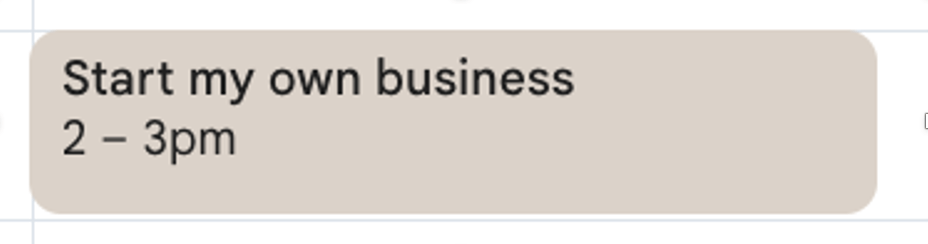
    I might be afraid of ‘starting a business,’ but I am certainly not afraid of doing each of these tasks individually! They are bite-sized, and super manageable. They each take less than 30 minutes and are incredibly approachable compared to my previous list which said “start my own business.” Literally that is what it said:

    That is completely unapproachable. Instead, I broke it down into 3 mini-tasks. See the below screenshot from my calendar. Green = complete. Grey = To be completed.

    That “Start my own business” box kept getting pushed from week to week, and I never was able to mark it as complete (until now!)

    How can I break down my goals into small, actionable steps?

    That is the question that I believe is key to getting your business off the ground. Overcoming fear of starting and actually launching. How can you break each starting step down even further? Let’s say I have minimal writing experience, could I break down my first two steps even further?

    For example, to break down “draft blog #1” entail, I broke it down into these steps:

    1. Brainstorm ideas. The goal of this was to get 300-500 words in stream of consciousness on the page. I am not a great typist, so I used dictation on my phone because that helped make it even more approachable.
    2. Set up 10 bullet points to cover in the article after picking an idea. After the stream of concious brainstorm, the goal of these bullet points was to set a ‘structure’ for the blog. This gave me 10, small mini-tasks that I would need to complete (in the form of writing a few sentences for each bullet point).
    3. Start drafting bullet points number one through three… etc

    That is what we’re doing here. We’re breaking down. You’re starting… and breaking down your steps even further to help you get over your fear, and move toward action. Can you actually launch the business you’ve always wanted to? Absolutely. Just take it in bite sized pieces.

    What next?

    You know you want to start that business, but right now, I want you to get out a piece of paper, or your notes on your phone / computer, and BREAK IT DOWN. What are the 3-5 first steps you should take? Write those down, tackle them 1 by 1, and get out there!

    November 22, 2024

  • The Art of Connection

    Welcome to WordPress! This is a sample post. Edit or delete it to take the first step in your blogging journey. To add more content here, click the small plus icon at the top left corner. There, you will find an existing selection of WordPress blocks and patterns, something to suit your every need for content creation. And don’t forget to check out the List View: click the icon a few spots to the right of the plus icon and you’ll get a tidy, easy-to-view list of the blocks and patterns in your post.

    November 22, 2024

  • Beyond the Obstacle

    Welcome to WordPress! This is a sample post. Edit or delete it to take the first step in your blogging journey. To add more content here, click the small plus icon at the top left corner. There, you will find an existing selection of WordPress blocks and patterns, something to suit your every need for content creation. And don’t forget to check out the List View: click the icon a few spots to the right of the plus icon and you’ll get a tidy, easy-to-view list of the blocks and patterns in your post.

    November 22, 2024

  • Growth Unlocked

    Welcome to WordPress! This is a sample post. Edit or delete it to take the first step in your blogging journey. To add more content here, click the small plus icon at the top left corner. There, you will find an existing selection of WordPress blocks and patterns, something to suit your every need for content creation. And don’t forget to check out the List View: click the icon a few spots to the right of the plus icon and you’ll get a tidy, easy-to-view list of the blocks and patterns in your post.

    November 22, 2024

  • Collaboration Magic

    Welcome to WordPress! This is a sample post. Edit or delete it to take the first step in your blogging journey. To add more content here, click the small plus icon at the top left corner. There, you will find an existing selection of WordPress blocks and patterns, something to suit your every need for content creation. And don’t forget to check out the List View: click the icon a few spots to the right of the plus icon and you’ll get a tidy, easy-to-view list of the blocks and patterns in your post.

    November 22, 2024

Blog at WordPress.com.


Loading Comments...
 

    • Subscribe Subscribed
      • Startup Feature
      • Already have a WordPress.com account? Log in now.
      • Startup Feature
      • Subscribe Subscribed
      • Sign up
      • Log in
      • Report this content
      • View site in Reader
      • Manage subscriptions
      • Collapse this bar